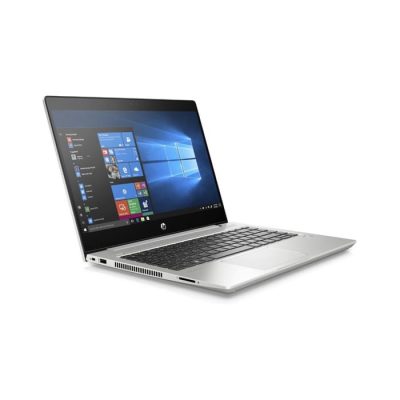


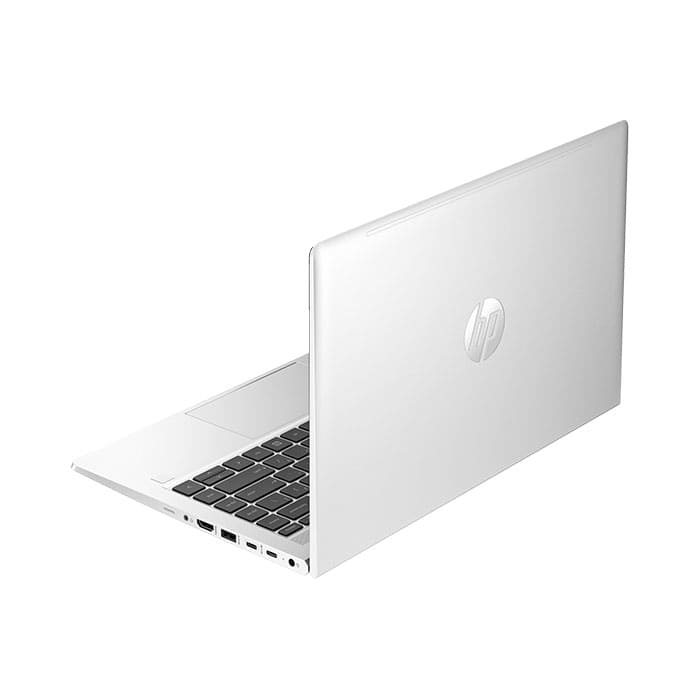
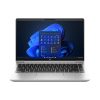
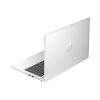
(8P022PA#AKL) Notebook “HP” ProBook 440 G10-022TU i5-1335U/8GB/512GB SSD/14.0″/DOS
27,700 ฿
สินค้าโมเดลนี้ตกรุ่น (End-of-Life) แล้ว
กรุณาติดต่อเพื่อสอบถามรุ่นทดแทน
ราคาสินค้ายังไม่รวมภาษีมูลค่าเพิ่ม 7%
รับประกัน 3 ปี Onsite

กรุณาติดต่อเพื่อเช็ค Stock
ติดต่อเราเพื่อสั่งซื้อ สอบถาม หรือขอใบเสนอราคาโทร : 02-713-2261 หรือ 063-819-7299


| SKU | 8P022PA#AKL |
| Name | (8P022PA#AKL) Notebook “HP” ProBook 440G 10-022TU i5-1335U/8GB/512GB SSD/14″ FHD/DOS |
| Model | HP ProBook 440 G10 14 inch Business Laptop PC |
| Display Size | 14 inch FHD (1920×1080) Anti-Glare LED UWVA 250 for HD Webcam Narrow Bezel bent |
| Processor | Intel® Core™ i5-1335U (12 MB Intel® Smart Cache, 10Cores(2P/8E)/12Threads, up to 4.60GHz) |
| Ram | 8GB (1x8GB) DDR4 3200 |
| Storage | 512GB PCIe NVMe Value Solid State Drive |
| Graphics | Integrated Graphics : Intel UHD Graphics (*Dual channel memory will function as Intel Iris Graphics) |
| Optical Drive | None |
| Network | HP INTEL AX211 WI-FI 6E 160MHZ +BT 5.3 WLAN |
| I/O Ports | 2x USB Type-C® 10Gbps signaling rate (USB Power Delivery, DisplayPort™ 2.1) 2x USB Type-A 5Gbps signaling rate (1 charging, 1 power) 1x AC power 1x HDMI 2.1b 1x stereo headphone/microphone combo jack 1x RJ-45 |
| Camera | Dual AryMic HD USB2 WFOV Integrated Camera |
| Keyboard | Clickpad spill-resistant |
| Battery | Long Life 51Whr Fast Charge 3 cell Battery + 45 Watt Smart nPFC Right Angle AC Adapter |
| OS | DOS |
| Security Software Licenses | HP Wolf Pro Security Edition 1 Yr |
| Dimensions (W X D X H) | 12.67 x 8.42 x 0.78 in |
| Weight | Starting at 1.37 kg |
| Warranty | HP 3y Onsite Notebook Bundle HW Support |
* กรุณาตรวจสอบสเปคกับผู้ขายอีกครั้ง (เช่น สี, Optical Drive หรือ Wi-Fi เป็นต้น)
รับสิทธิ์สั่งซื้อสินค้าเสริมในราคาพิเศษ
ซื้อโน๊ตบุ๊คกับเรา รับสิทธิ์ส่วนลดสินค้าด้านล่างนี้ในราคาพิเศษได้ทันที เมื่อสั่งซื้อพร้อมกันกับตัวเครื่อง ติดต่อเราเพื่อสั่งซื้อที่นี่
หมายเหตุ : สนใจซื้อสินค้าเสริม กรุณาติดต่อพนักงานขาย

(EP2-06630) Microsoft Office Home and Business 2024
6,800.- (ปกติ 7,000.-)
ชุดโปรแกรม ไมโครซอฟท์ออฟฟิศ สำหรับองค์กร ลิขสิทธิ์ตลอดชีพ

(FQC-10528) Microsoft Windows 11 Pro 64 Bit OEM
5,000.- (ปกติ 5,200.-)
Windows 11 Pro ลิขสิทธิ์ตลอดชีพของแท้ *สำหรับรุ่นที่ไม่มี OS
ขาย HP ProBook 440 G10 รุ่น 8P022PA#AKL ราคาถูก โดยตัวแทนจำหน่าย
จำหน่าย Notebook HP รุ่น ProBook 440 G10 โมเดล 8P022PA#AKL ราคาพิเศษที่สุดในประเทศไทย พร้อมบริการจัดส่งฟรี รับประกันศูนย์ ของแท้ สามารถเพิ่มสเปคเช่น Ram, SSD หรือ OS ได้ตามต้องการ
Components
Your 8P022PA#AKL features top-rated components. This chapter provides details about your components, where they are located, and how they work.
Locating hardware
Use these instructions to find out what hardware is installed on your computer.
- Select the Search icon in the taskbar, type device manager in the search box, and then select the Device Manager app.
A list displays all the devices installed on your computer.
For information about system hardware components and the system BIOS version number, press fn+esc (select products only).
Locating software
Use these instructions to find out what software is installed on your 8P022PA#AKL
- Right-click the Start button, and then select Apps and Features.
Network connections
Your 8P022PA#AKL can travel with you wherever you go. But even at home, you can explore the globe and access information from millions of websites by using your computer and a wired or wireless network connection. This chapter helps you get connected to that world.
Connecting to a wireless network
Your 8P022PA#AKL might be equipped with one or more wireless devices.
WLAN device—Connects the computer to wireless local area networks, which are commonly referred to as Wi-Fi networks, wireless LANs, or WLANs. These connections typically occur in corporate offices, your home, and public places such as airports, restaurants, coffee shops, hotels, and universities. In a WLAN, the mobile wireless device in your computer communicates with a wireless router or a wireless access point.
HP Mobile Broadband Module (select products only)—A wireless wide area network (WWAN) device that gives you wireless connectivity over a much larger area. Mobile network operators install base stations (similar to cell phone towers) throughout large geographic areas, effectively providing coverage across entire states, regions, or even countries.
Bluetooth® device—Creates a personal area network (PAN) to connect to other Bluetooth-enabled devices such as computers, phones, printers, headsets, speakers, and cameras. In a PAN, each device communicates directly with other devices, and devices must be relatively close together— typically within 10 m (approximately 33 ft) of each other.
Click Here to learn more about HP Support
สนใจสินค้ารายการอื่นๆนอกจาก 8P022PA#AKL
เข้าดูเพิ่มเติมได้ที่หน้า Notebook ของเรา
Related products