

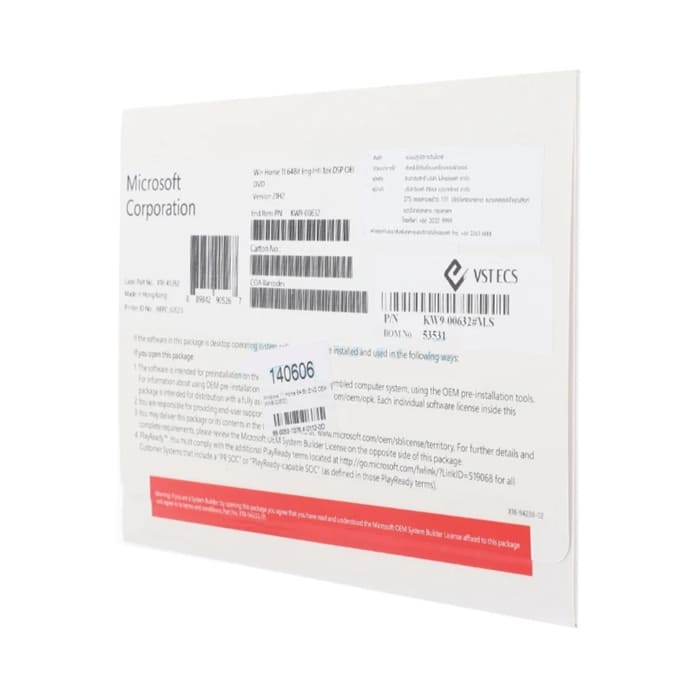
(KW9-00632) “Microsoft” Windows 11 Home 64 Bit OEM
4,790 ฿
ลิขสิทธิ์แบบซื้อขาดถาวร
ราคาสินค้ายังไม่รวมภาษีมูลค่าเพิ่ม 7%

กรุณาติดต่อเพื่อเช็ค Stock
ติดต่อเราเพื่อสั่งซื้อ สอบถาม หรือขอใบเสนอราคาโทร : 02-713-2261 หรือ 063-819-7299


ขาย Windows 11 Home OEM (KW9-00632)
- Windows 11 Home (KW9-00632) สำหรับ คอมพิวเตอร์ แลปทอป หรือ โน๊ตบุ๊ค
- แบบซื้อขาด ลงกับตัวเครื่องถาวร
- อัพเดตเวอร์ชั่นตลอดไป
- ลิขสิทธิ์สำหรับเครื่องใหม่เท่านั้น ไม่สามารถลงใช้กับเครื่องเก่าได้
- เหมาะสำหรับใช้งานตามบ้าน แบบ Home Use
Windows Pro ต่างกับ Home ยังไง อ่านได้ที่นี่
ความต้องการ
- ตัวประมวลผลที่ต้องใช้
ตัวประมวลผลความเร็ว 1 กิกะเฮิรตซ์ (GHz) ขึ้นไปที่ใช้งานร่วมกันได้ - หน่วยความจำที่ต้องใช้
RAM 1 กิกะไบต์ สำหรับ 32 บิต); 2 กิกะไบต์ สำหรับ 64 บิต - เนื้อที่ฮาร์ดดิสก์ที่ต้องใช้
เนื้อที่ฮาร์ดดิสก์ 20 กิกะไบต์ - การ์ดแสดงผลที่ต้องใช้
ความละเอียดหน้าจอ 800 x 600 จุดขึ้นไป ตัวประมวลผลกราฟิก DirectX® 9 ที่มีโปรแกรมควบคุม WDDM - การเชื่อมต่อที่ต้องใช้
การเชื่อมต่ออินเทอร์เน็ต (อาจมีค่าบริการเพิ่ม) - ความต้องการอื่นๆ ของระบบ
คุณสมบัติบางประการอาจต้องใช้บัญชี Microsoft การดูดีวีดีต้องใช้ซอฟต์แวร์การเล่นแยกต่างหาก - ความต้องการของระบบเพิ่มเติม
คุณต้องยอมรับข้อกำหนดของใบอนุญาตให้ใช้งานที่แนบมา รวมทั้งที่ microsoft.com/useterms ต้องมีการเปิดใช้งาน • สิทธิ์อนุญาตใช้เครื่องเดียว • 32 & 64 บิต ใน USB 3.0 ที่มีรวมไว้
Click Here to learn more about Microsoft Support
Balance work and family
See how multitasking parents use Windows 11 Home (KW9-00632) to get it all done.
Always look your best
Keep the conversation going with fast WiFi capabilities and available high-quality cameras.
Protection gets personal
Personal Vault provides an additional layer of protection for your most important files.
Log in with a glance
Windows Hello logs you in with your face or fingerprint three times faster than typing in a password.
Powerful Microsoft 365 apps
Premium Office apps, extra cloud storage, and advanced security—in one subscription.
You can count on Windows 11
People all over the world depend on Windows 11 Home (KW9-00632) for many different reasons. Here are a handful of things we’re proud to keep on delivering.
Get things done
Windows 11 has innovations from touch screen support to features that help you focus and create.
All-encompassing security included
Windows 11 comes with a comprehensive suite of antivirus, firewall, ransomware protection, and Internet features, built-in with no extra cost to you.
New games for family night
There’s a wide variety of games available on Windows 11 Home (KW9-00632) – the most popular PC gaming platform on the planet.
Windows Update
In Windows 11, you decide when and how to get the latest updates to keep your device running smoothly and securely. To manage your options and see available updates, select Check for Windows updates. Or select the Start button, and then go to Settings > Update & Security > Windows Update
หมายเหตุ
อาจไม่มีคุณสมบัติครบทั้งหมดในทุกรุ่นหรือเวอร์ชั่นของ Windows ระบบอาจต้องปรับและ / หรือฮาร์ดแวร์ซื้อแยกต่างหาก, ไดรเวอร์ซอฟต์แวร์หรือการอัพเดตไบออสที่จะใช้ประโยชน์จาก Windows การทำงาน จะมีการอัพเดต Windows 11 โดยอัตโนมัติ ซึ่งจะมีการเปิดใช้งานไว้ตลอดเวลา อาจมีค่าธรรมเนียมจากผู้ให้บริการอินเทอร์เน็ต และอาจมีข้อกำหนดเพิ่มเติมที่มีผลบังคับใช้สำหรับการอัพเดตในแต่ละช่วงเวลา ดูที่ http://www.microsoft.com
สนใจ Software อื่นๆ นอกจาก KW9-00632
เลือกดูได้ที่ หน้าสินค้า Software ของเรา
Related products


